
Contents
- Getting started
- Key features
- Authorization methods
- Customize the list of public pages, groups and friends
- Reports
- Supported command line options
Getting started
- Download
vk-likesfinder-<VERSION>-cli-win.exe(for Windows) orvk-likesfinder-<VERSION>-cli-lin(for Linux) orvk-likesfinder-<VERSION>-cli-mac(for macOS) application. - Run the application in command line:
vk-likesfinder-<VERSION>-cli-<PLATFORM> --user <USER> --interval <INTERVAL>,
where
<VERSION>is the version of VK LikesFinder you use,
<PLATFORM>iswin,linormac,
<USER>is person that should to be checked; supports short name of page (e.g., durov) or user ID (e.g., 1),
<INTERVAL>is searching interval in hours till now, e.g., 10.
E.g.:vk-likesfinder-1.0.0-cli-win.exe --user durov --interval 10
See the full list of Supported command line options for more. - If you did not provide access/service token through
--tokenoption, or did not createauthorization_token.txtfile with the token inside it in the directory with VK LikesFinder binary/script, you will be redirected to user-interactive mode, where you can authorize to VK using one of three methods (see Authorization methods for more):- by providing login/password to VK API
- by generating access token through your browser
- by generating service token for your VK application
- Find the vk-likesfinder-report-***.html report in the directory where application was launched.
Key features
- Cross-platform, supports Windows, Linux and macOS.
- Check selected user’s likes on his friends, public and group pages
- Customize the lists of public pages, groups and friends (for more see Customize the list of public pages, groups and friends):
- skip some pages,
- add pages (public pages or groups), on which selected user doesn’t subscribed
- add people with whom selected user is not friends
- Select the searching interval in hours
- Clear and handy authorization process to VK API: for more see Authorization methods
- Different report formats: for more see Reports
Authorization methods
If you did not provide access/service token through --token option, or did not create
authorization_token.txt file with the token inside it in the directory with VK LikesFinder
binary/script, you will be redirected to the following user-interactive mode:
You are not authorized to access VK.

You can authorize to VK in the 3 ways:
  1. Enter login and password
  2. Use browser to generate access token and type it here (PREFERRED)
  3. Use browser to create empty VK standalone application, generate service token
     and type it here (in this case you can't access user's page if you and user
     are friends and page is private for non-friends, and you can't access
     user's groups if they are visible for you)
What would you choose? (press number): _
Let’s look at the each of methods more deeply.
(1) Login/password
What would you choose? (press number): 1
Login: example@example.com
Password: ********************
You need to provide your VK login and password to VK API. Login and password is not stored anywhere - you need to provide them each time you run VK LikesFinder.
(2) Access token
What would you choose? (press number): 2
Opening a browser...
After logging in to VK and granting the access to the VK LikesFinder app, you
need to copy access_token from address bar and paste it below.
Enter access token here: _
This method provides you to create your own access token - the unique character set. You will be re-directed to oauth.vk.com, where you need to log in and grant the access to VK LikesFinder app. After that you will be re-directed to the blank page. It will have the following address in address bar:
https://api.vk.com/blank.html#access_token=<ACCESS_TOKEN>&expires_in=0&user_id=<YOUR_USER_ID>
You need to copy <ACCESS_TOKEN> and paste it to the app:
Enter access token here: _
After that authorization_token.txt file with the token inside it in the directory with
VK LikesFinder binary/script will be created and you don’t need to generate your access token
again. If you need to create another token, remove authorization_token.txt file.
Note: the following browsers are supported only (each should be installed to default
directory): Chrome on Windows, Firefox on Linux and Safari on macOS.
If the browser failed to open automatically, open it manually and go to this link:
https://oauth.vk.com/authorize?client_id=6456882&redirect_uri=https://vk.com&v=5.92&response_type=token&scope=friends,groups,offline
(3) Service token
Create an Application on VK (see link below). Type anything to Title section,
e.g., VK LikesFinder, choose Platform as Standalone Application and press
Connect Application button. When press Save button. Go to Settings and copy
service_token and paste it below.

Link: https://vk.com/editapp?act=create

Enter service token here: _
(experimental, not for production use)
Customize the list of public pages, groups and friends
You can customize the lists of public pages, groups and people in which you want to find selected
user’s likes.
By default, it is "all". It means that all user’s public pages, groups and friends will be scanned:
--public_pages "all"
--groups "all"
--people "all"
If you want this scenario, you don’t need to set "all" value to these options, just
don’t mention them.
NOTE: you can’t check user’s groups using service token.
If you want to add some custom public page(s), group(s) or person (people), pass
"all,some_value" (comma is separator),
where "some_value" is the short name of
- public page, e.g.,
"pikabu"(https://vk.com/pikabu)
or
- group, e.g.,
"the_elder_council"(https://vk.com/the_elder_council)
or
- person, e.g.,
"durov"or"1"(https://vk.com/durov, https://vk.com/id1)
E.g.,
--public_pages "all,pikabu,tj"
--groups "all,apple"
--people "all,1"
If you want to scan only some specific pages (not the default ones), don’t add "all", just pass short names of
public page(s), group(s) or person (people): "some_value_1,some_value_2".
E.g.,
--public_pages "pikabu,tj"
--groups "apple"
--people "durov"
If you want to skip some public pages, groups or people from "all", add "!" symbol
(or "\!" on some Linux systems) at the beginning of skipping element, e.g.,
"!person_1,!person_2" or "all,!person_1,!person_2" - in this case all friends will be scanned, except two
friends with short names "person_1" and "person_2".
E.g.,
--public_pages "!leprum"
--groups "all,!dccmc"
--people "!durov"
If you want to completely skip checking of public pages, groups or people, pass "none" to
some of these options.
E.g.,
--public_pages "!leprum"
--groups "none"
--people "none"
In this case checking of groups and people will be skipped, and only public pages, except https://vk.com/leprum, will be checked.
Reports
VK LikesFinder supports reports in the following formats: HTML, command line and Python list.
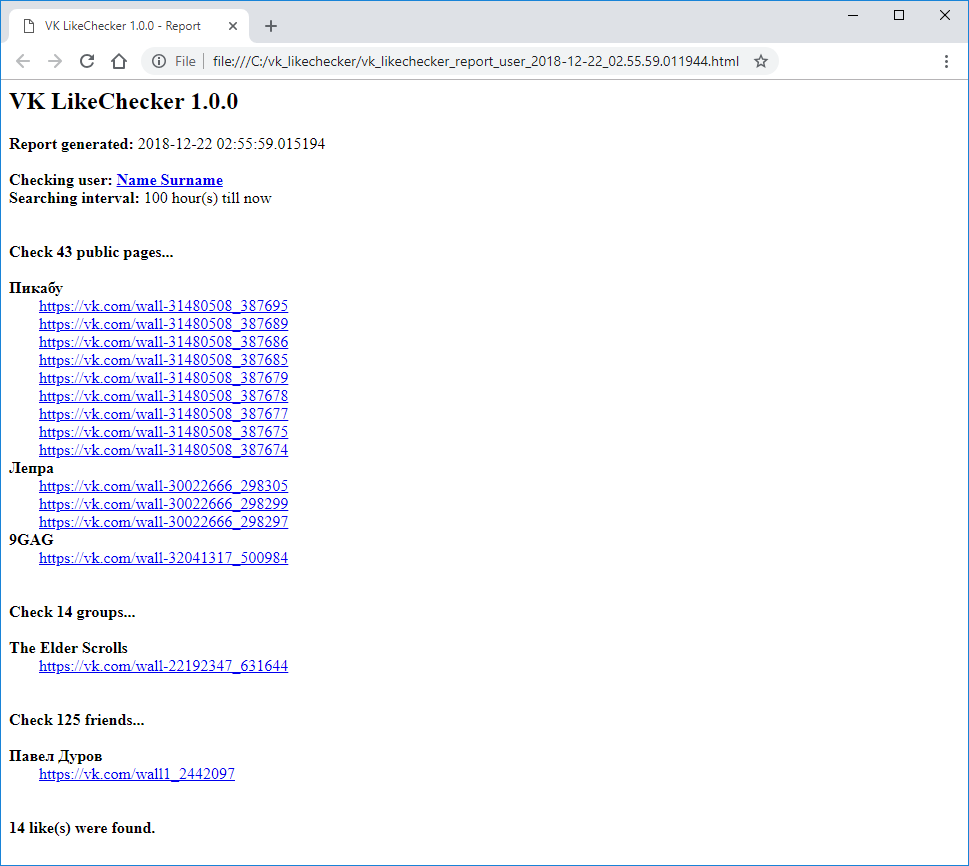
HTML
The similar report will be generated in the directory where application was launched:
Command line
root@ubuntu:~$ vk-likesfinder-1.0.0-cli-lin --user *** --interval 100
===============================================================================
VK LikesFinder 1.0.0
===============================================================================

HTML report created:
    C:\vk_likesfinder\vk_likesfinder_report_user_2018-12-22_02.55.59.011944.html

Authorized to VK successfully.
VK API initialized successfully.

Checking user: Name Surname
Searching interval: 100 hour(s) till now

Check 43 public pages...
Пикабу
    https://vk.com/wall-31480508_387695
    https://vk.com/wall-31480508_387689
    https://vk.com/wall-31480508_387686
    https://vk.com/wall-31480508_387685
    https://vk.com/wall-31480508_387679
    https://vk.com/wall-31480508_387678
    https://vk.com/wall-31480508_387677
    https://vk.com/wall-31480508_387675
    https://vk.com/wall-31480508_387674
Лепра
    https://vk.com/wall-30022666_298305
    https://vk.com/wall-30022666_298299
    https://vk.com/wall-30022666_298297
9GAG
    https://vk.com/wall-32041317_500984
Check 43/43

Check 14 groups...
The Elder Scrolls
    https://vk.com/wall-22192347_631644
Check 14/14

Check 125 friends...
Павел Дуров
    https://vk.com/wall1_2442097
Check 125/125

14 like(s) were found.
Python list
If you Python developer, you can call get_liked_public_pages_posts(...) and/or
get_liked_groups_posts(...) and/or get_liked_people_posts(...) from
VkLikesFinder class in src/vk_likesfinder.py.
The following will return:
[ ['Пикабу', 'https://vk.com/wall-31480508_387695'],
  ['Пикабу', 'https://vk.com/wall-31480508_387689'],
  ['Пикабу', 'https://vk.com/wall-31480508_387686'],
  ['Пикабу', 'https://vk.com/wall-31480508_387685'],
  ['Пикабу', 'https://vk.com/wall-31480508_387679'],
  ['Пикабу', 'https://vk.com/wall-31480508_387678'],
  ['Пикабу', 'https://vk.com/wall-31480508_387677'],
  ['Пикабу', 'https://vk.com/wall-31480508_387675'],
  ['Пикабу', 'https://vk.com/wall-31480508_387674'],
  ['Лепра', 'https://vk.com/wall-30022666_298305'],
  ['Лепра', 'https://vk.com/wall-30022666_298299'],
  ['Лепра', 'https://vk.com/wall-30022666_298297'],
  ['9GAG', 'https://vk.com/wall-32041317_500984'] ]

[ ['The Elder Scrolls', 'https://vk.com/wall-22192347_631644'] ]

[ ['Павел Дуров', 'https://vk.com/wall1_2442097'] ]
Supported command line options
usage: vk-likesfinder-cli-*** [-h] [-to TOKEN] [-at AUTHORIZATION_TOKEN_FILE]
                              -us USER -in INTERVAL [-pp PUBLIC_PAGES]
                              [-gr GROUPS] [-pe PEOPLE] [-hr HTML_REPORT] [-v]

VK LikesFinder

optional arguments:
  -h, --help            show this help message and exit
  -to TOKEN, --token TOKEN
                        Your access/service token. It needs for authorization
                        to VK. If you need to obtain token or use your
                        login/password, don't mention this option, the
                        application will suggest you how you can authorize to
                        VK in user-interactive mode
  -at AUTHORIZATION_TOKEN_FILE, --authorization_token_file AUTHORIZATION_TOKEN_FILE
                        Path to text file with your access/service token for
                        accessing VK. Follow documentation to see how it
                        should be organized. Paste a token to it, and it will
                        be automatically used on authorization step. If you
                        need to obtain token, you will be moved to
                        user-interactive mode. After that
                        authorization_token.txt
                        will be created automatically, and you won't need to
                        obtain your token again.
  -us USER, --user USER
                        Short name or ID of checked user
  -in INTERVAL, --interval INTERVAL
                        Searching interval in hours
  -pp PUBLIC_PAGES, --public_pages PUBLIC_PAGES
                        A list of public pages, in which likes will be
                        searched.
                        1. It's "all" by default. It means that all
                           user's public pages will be scanned.
                        2. If you want to add some custom public page, pass
                           "all,some_public_page" (comma is separator),
                           where "some_public_page" is the short name of page
                           (vk.com/some_public_page).
                        3. If you want to scan only some specific pages,
                           don't add "all", just pass short names of
                           public page: "public_page_1,public_page_2".
                        4. If you want to skip some public pages from
                           "all", add "!" symbol (or "\!" on some Linux
                           systems) at the beginning of skipping element,
                           e.g., "!public_page_1,!public_page_2"  or
                           "all,!public_page_1,!public_page_2" - in
                           this case all public pages will be scanned, except
                           two public pages with short names "public_page_1"
                           and "public_page_2".
                        5. If you want to completely skip checking of public
                           pages, pass "none".
  -gr GROUPS, --groups GROUPS
                        A list of groups, in which likes will be searched.
                        1. It's "all" by default. It means that all
                           user's groups will be scanned. NOTE - you can't
                           check user's groups using service token.
                        2. If you want to add some custom group, pass
                           "all,some_group" (comma is separator), where
                           "some_group" is the short name of group
                           (vk.com/some_group).
                        3. If you want to scan only some specific groups,
                           don't add "all", just pass short names of
                           group: "group_1,group_2".
                        4. If you want to skip some groups from "all", add
                           "!" symbol (or "\!" on some Linux systems) at the
                           beginning of skipping element, e.g.,
                           "!group_1,!group_2" or "all,!group_1,!group_2" -
                           in this case all groups will be scanned, except
                           two groups with short names "group_1" and
                           "group_2".
                        5. If you want to completely skip checking of groups,
                           pass "none".
  -pe PEOPLE, --people PEOPLE
                        A list of people, in which likes will be searched.
                        1. It's "all" by default. It means that all
                           user's friends will be scanned.
                        2. If you want to add some custom person, pass
                           "all,some_person" (comma is separator), where
                           "some_person" is the short name of person's page
                           (vk.com/some_person). As usual, user IDs are
                           supported.
                        3. If you want to scan only some specific people,
                           don't add "all", just pass short names/IDs of
                           people: "person_1,person_2".
                        4. If you want to skip some people from "all", add
                           "!" symbol (or "\!" on some Linux systems) at the
                           beginning of skipping element, e.g.,
                           "!person_1,!person_2" or
                           "default,!person_1,!person_2" - in this case all
                           friends will be scanned, except two friends with
                           short names "person_1" and "person_2".
                        5. If you want to completely skip checking of people,
                           pass "none".
  -hr HTML_REPORT, --html_report HTML_REPORT
                        Custom path to HTML report (by default it generates in
                        the folder where VK LikesFinder binary/script is
                        located)
  -v, --version         Show VK LikesFinder version and exit